py watch bnb价格
效果
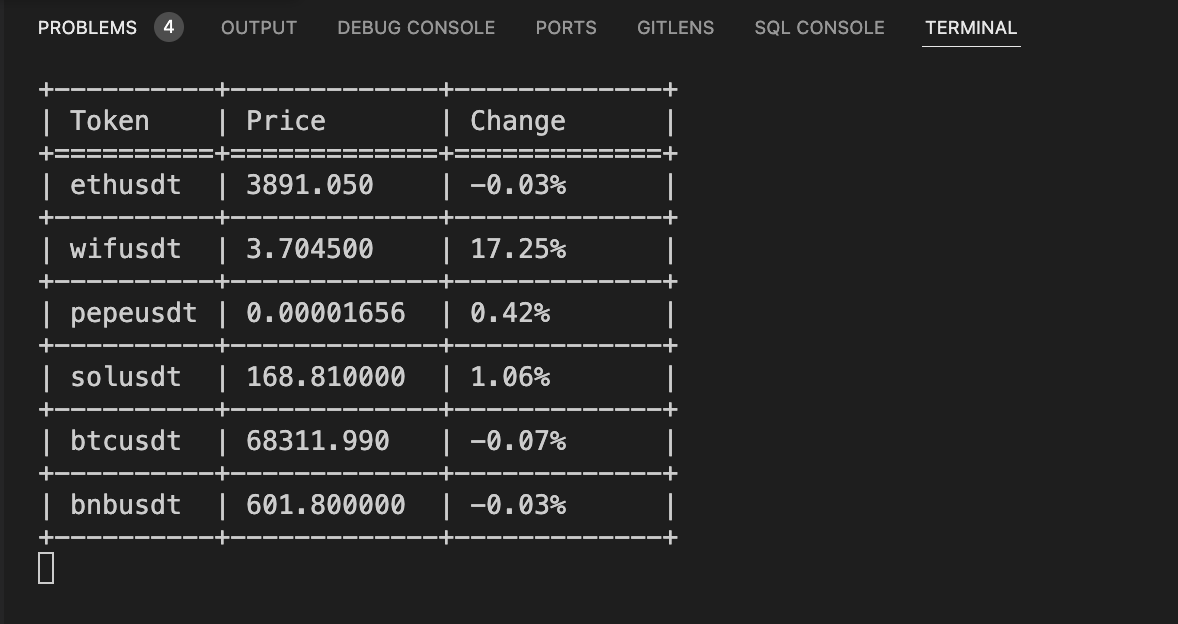
代码
import asyncio
import websockets
import json
import os

# 这个函数用于处理单个WebSocket连接
async def binance_price_stream(pair, webhook_url, queue):
    token = pair["token"].lower()
    stream_url = f"wss://stream.binance.com/ws/{token}@ticker"
    while True:
        try:
            async with websockets.connect(stream_url) as websocket:
                while True:
                    message = await websocket.recv()
                    data = json.loads(message)
                    # 将价格转换为字符串,并确保小数点形式显示
                    current_price = float(data['c'])  # 当前价格
                    open_price = float(data['o'])  # 开盘价格
                    change_percentage = ((current_price - open_price) / open_price) * 100  # 计算涨幅百分比
                    # 将价格数据放入队列
                    await queue.put((pair["token"], current_price, change_percentage))

        except websockets.ConnectionClosed:
            print(f"Connection to {token} closed, attempting to reconnect...")
            await asyncio.sleep(1)  # 简单的重连延迟
        except Exception as e:
            print(f"Error with {token}: {e}")
            await asyncio.sleep(1)

# 这个函数启动所有监听任务
async def start_streams(pairs, webhook_url, queue):
    tasks = []
    for pair in pairs:
        task = asyncio.create_task(binance_price_stream(pair, webhook_url, queue))
        tasks.append(task)
    await asyncio.gather(*tasks)

# 清理控制台
def clear_console():
    os.system('cls' if os.name == 'nt' else 'clear')

# 手动实现表格显示
def print_table(data):
    # 定义表格边框和表头
    header = "+----------+-------------+-------------+\n| Token    | Price       | Change      |\n+==========+=============+=============+"
    row_template = "| {token:<8} | {price:<11} | {change:<10}  |"
    separator = "+----------+-------------+-------------+"

    # 打印表头
    print(header)

    # 打印每一行数据
    for token, info in data.items():
        price = info["price"]
        change = info["change"]
        # 格式化价格,避免科学计数法
        try:
            price_float = float(price)
            if price_float >= 1000:
                price_str = f"{price_float:.3f}"
            elif price_float >= 1:
                price_str = f"{price_float:.6f}"
            else:
                price_str = f"{price_float:.8f}"
        except ValueError:
            price_str = price

        print(row_template.format(token=token, price=price_str, change=change))
        print(separator)

# 显示加密货币对的表格,并在每次输出前清理控制台
async def display_pairs(pairs, queue):
    table_data = {pair["token"]: {"price": "0.00000000", "change": "0.00%"} for pair in pairs}  # 初始化为字符串 "0.00000000" 和 "0.00%"
    while True:
        clear_console()
        # 从队列中获取价格更新
        while not queue.empty():
            token, price, change = await queue.get()
            table_data[token]["price"] = f"{price:.8f}"
            table_data[token]["change"] = f"{change:.2f}%"
        # 使用自定义函数打印表格
        print_table(table_data)
        await asyncio.sleep(0.1)  # 等待0.1秒钟

# 要监听的代币对列表
pairs_to_watch = [
  {"token": "ethusdt", "thresholds": [3650, 3780],"show": True},
  {"token": "wifusdt", "thresholds": [2.5, 2.9], "show": True},
  {"token": "pepeusdt", "thresholds": [0, 1], "show": True},
  {"token": "solusdt", "thresholds": [140, 170], "show": True},
  {"token": "btcusdt", "thresholds": [68600, 70000], "show": True},
  {"token": "bnbusdt", "thresholds": [580, 620], "show": True}
]

# Discord Webhook URL
discord_webhook_url = "YOUR_DISCORD_WEBHOOK_URL"

# 主函数
async def main():
    queue = asyncio.Queue()
    await asyncio.gather(
        start_streams(pairs_to_watch, discord_webhook_url, queue),
        display_pairs(pairs_to_watch, queue)
    )

# 运行程序
asyncio.run(main())
队列
使用队列(Queue)在这个程序中有几个重要的原因:
-
线程安全:
- 在异步编程中,多个任务可能会同时运行,并尝试访问和修改共享数据。使用队列可以确保对共享数据的访问是线程安全的,因为队列内部会处理同步问题,避免数据竞争和不一致。
-
解耦任务:
- 生产者-消费者模式:队列用于解耦数据生产者和消费者。在这个程序中,
binance_price_stream函数是生产者,它从 WebSocket 连接中接收价格数据并将其放入队列。display_pairs函数是消费者,它从队列中读取数据并更新显示。这样做的好处是,生产者和消费者可以独立运行,互不干扰。 - 这种解耦使得代码更易于维护和扩展。如果将来需要添加更多的数据处理逻辑,只需在生产者和消费者之间修改队列处理逻辑即可,而不需要修改两者的实现细节。
- 生产者-消费者模式:队列用于解耦数据生产者和消费者。在这个程序中,
-
异步处理:
- 队列可以在异步环境中高效地工作。异步队列允许生产者和消费者以非阻塞的方式进行数据传递,这对于处理高频率的数据更新非常重要。通过
await queue.put(...)和await queue.get(...),可以确保任务在需要时等待,而不会阻塞整个事件循环。
- 队列可以在异步环境中高效地工作。异步队列允许生产者和消费者以非阻塞的方式进行数据传递,这对于处理高频率的数据更新非常重要。通过
-
缓冲区功能:
- 队列可以充当缓冲区的角色,暂存生产者产生的数据,直到消费者准备好处理它们。这在网络通信中尤为重要,因为网络延迟和数据处理速度可能不一致。队列可以平滑这种不一致性,避免数据丢失或处理延迟。
在这个具体的程序中,binance_price_stream 函数不断接收来自 Binance WebSocket 的价格数据,并将其放入队列中。而 display_pairs 函数则不断从队列中读取最新的价格数据,并更新显示。这种设计确保了数据处理的高效和可靠,同时保持代码的简洁和可维护性。
display_pairs 是如何被触发的
在这个程序中,display_pairs 函数是通过 asyncio.gather 函数与 start_streams 一起被触发和运行的。具体来说,asyncio.gather 会并行运行传递给它的所有异步任务。
以下是关键代码部分:
# 主函数
async def main():
    queue = asyncio.Queue()
    await asyncio.gather(
        start_streams(pairs_to_watch, discord_webhook_url, queue),
        display_pairs(pairs_to_watch, queue)
    )

# 运行程序
asyncio.run(main())
详细解释:
-
main函数:main函数是程序的入口点。在这个函数中,首先创建了一个异步队列queue。- 然后,
await asyncio.gather(...)被调用,传入两个异步任务:start_streams和display_pairs。
-
asyncio.gather:asyncio.gather会并行运行传递给它的所有异步任务。在这个例子中,start_streams和display_pairs会同时运行。start_streams函数会启动多个binance_price_stream任务来监听不同的加密货币对的价格变化,并将这些数据放入队列中。display_pairs函数会从队列中读取数据并更新显示。
-
asyncio.run(main()):asyncio.run是一个用于启动异步事件循环并运行指定协程的函数。在这个例子中,它启动了main函数的执行。
display_pairs 的运行机制:
display_pairs函数是一个无限循环,它不断从队列中读取数据并更新显示。- 由于
display_pairs是通过asyncio.gather并行运行的,它会一直运行,直到程序终止。 - 每次从队列中读取数据时,
display_pairs会更新价格表并清理控制台,以显示最新的价格信息。
总结:
display_pairs函数通过asyncio.gather与其他任务一起被触发并运行。asyncio.gather确保display_pairs和start_streams同时运行,使得程序能够同时接收数据和显示数据。- 这种设计使得数据的生产和消费可以并行进行,从而实现实时数据更新和显示。
为什么无限循环不会导致我的电脑卡
在异步编程中,使用无限循环(如 while True)不会导致电脑卡顿的原因主要是因为异步编程模型的特点和事件循环的工作方式。以下是详细解释:
1. 非阻塞操作:
- 异步编程的核心在于非阻塞操作。异步函数在等待 I/O 操作(如网络请求、文件读写等)完成时,不会阻塞整个程序的执行。
- 在你的程序中,
await queue.get()和await asyncio.sleep(0.1)都是非阻塞操作。当代码执行到这些位置时,如果操作尚未完成,事件循环会切换到其他任务继续执行,而不会在当前任务上停滞。
2. 事件循环的调度:
- 异步编程依赖于事件循环来调度任务。事件循环会不断检查和执行准备好的任务,并在任务之间进行切换。
- 在你的程序中,事件循环会在
start_streams和display_pairs之间切换,确保它们都能得到执行时间。 - 由于
await关键字的使用,事件循环能够在任务等待时切换到其他任务,从而高效地利用系统资源。
3. 避免阻塞的设计:
- 在
display_pairs函数中,虽然有一个无限循环,但每次循环都会执行await asyncio.sleep(0.1)。这会让出控制权,允许事件循环在这段时间内处理其他任务。 - 同样地,
await queue.get()也是一个异步操作,它会在没有数据可供消费时让出控制权,而不是阻塞在这一步。
4. 异步队列的高效性:
- 异步队列(
asyncio.Queue)是为异步环境设计的,能够高效地处理生产者和消费者之间的数据传递。 - 当生产者将数据放入队列时,消费者可以异步地从队列中获取数据,而不会导致阻塞。
示例代码中的关键部分:
async def display_pairs(pairs, queue):
    table_data = {pair["token"]: "0.00000000" for pair in pairs}  # 初始化为字符串 "0.00000000"
    while True:
        clear_console()
        # 从队列中获取价格更新
        while not queue.empty():
            token, price = await queue.get()
            table_data[token] = price
        # 使用自定义函数打印表格
        print_table(table_data)
        await asyncio.sleep(0.1)  # 等待0.1秒钟
在这个代码片段中:
await queue.get()是异步的,如果队列为空,它会让出控制权。await asyncio.sleep(0.1)也是异步的,它会让事件循环在这段时间内处理其他任务。
总结:
异步编程模型通过非阻塞操作和事件循环的调度,使得即使在无限循环中,程序也能高效运行,不会导致系统卡顿。事件循环会在任务之间高效地切换,确保每个任务都有机会执行,从而充分利用系统资源。