Google drive example
演示
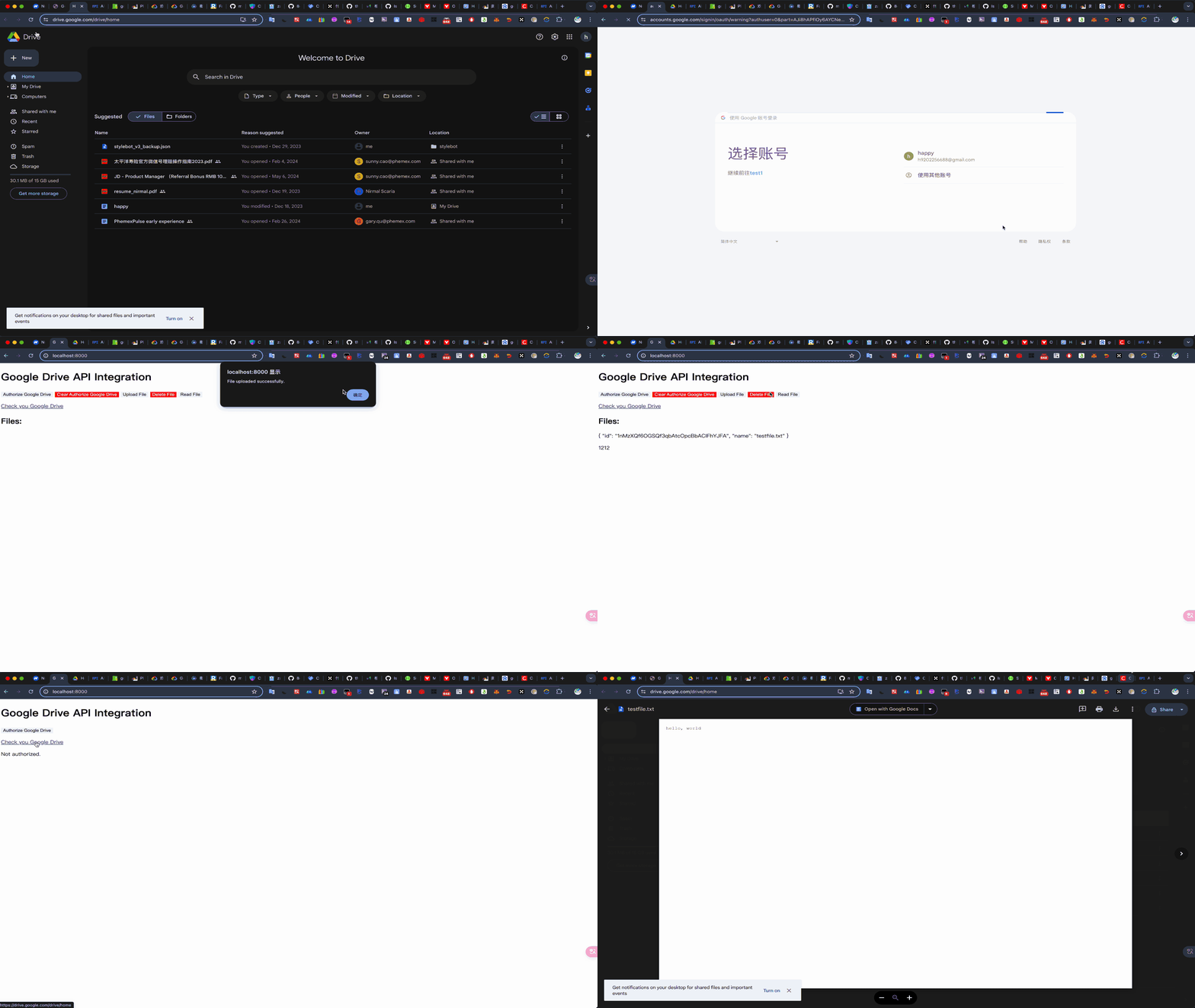
配置
要在 Google Cloud Console 中配置您的项目以使用 Google Drive API,您需要按照以下步骤进行操作:
1. 创建 Google Cloud 项目
- 访问 Google Cloud Console.
- 如果您还没有项目,请点击页面顶部的项目选择器,然后点击“新建项目”按钮。
- 输入项目名称并点击“创建”。
2. 启用 Google Drive API
- 在 Google Cloud Console 中,导航到左侧菜单的“API 和服务” > “库”。
- 在搜索框中输入“Google Drive API”并点击搜索结果。
- 点击“启用”按钮启用 Google Drive API。
3. 创建 OAuth 2.0 凭据
-
导航到左侧菜单的“API 和服务” > “凭据”。
-
点击“创建凭据”按钮,然后选择“OAuth 客户端 ID”。
-
如果您还没有配置 OAuth 同意屏幕,系统会提示您先进行配置:
- 点击“配置同意屏幕”按钮。
- 选择“外部”用户类型,然后点击“创建”。
- 填写应用名称、支持电子邮件和开发者联系信息等必填字段,然后点击“保存和继续”。
-
在“创建 OAuth 客户端 ID”页面:
- 选择“Web 应用程序”作为应用类型。
- 在“名称”字段中输入一个名称(例如“Web 客户端 1”)。
- 在“授权重定向 URI”部分,点击“添加 URI”并输入您的重定向 URI(例如,
http://localhost:8000/oauth2callback)。 - 点击“创建”按钮。
-
创建成功后,系统会显示一个对话框,包含您的客户端 ID 和客户端密钥。点击“下载 JSON”按钮将凭据文件下载到您的计算机。
4. 配置 OAuth 同意屏幕(如果需要)
- 导航到左侧菜单的“API 和服务” > “OAuth 同意屏幕”。
- 在这里,您可以配置应用名称、支持电子邮件、应用徽标、应用域和其他信息。
- 填写所有必填字段后,点击“保存和继续”。
5. 确认并保存设置
- 确保您的 OAuth 客户端凭据已正确下载,并保存在您的项目目录中,命名为
credentials.json。 - 确保您的 OAuth 同意屏幕配置已完成并保存。
code
app.py
app.py
from flask import Flask, redirect, url_for, session, request, jsonify, send_from_directory, Response
from google.oauth2.credentials import Credentials
from google_auth_oauthlib.flow import Flow
from googleapiclient.discovery import build
from googleapiclient.http import MediaFileUpload  # 导入MediaFileUpload
import os
import google.auth.exceptions

app = Flask(__name__)
app.secret_key = 'your_secret_key'

BASE_DIR = os.path.dirname(os.path.abspath(__file__))

# 测试文件
file_name = 'testfile.txt'
TEST_FILE = os.path.join(BASE_DIR, '.', file_name)


# 从 credentials.json 文件中加载客户端配置
os.environ['OAUTHLIB_INSECURE_TRANSPORT'] = '1'
CLIENT_SECRETS_FILE = os.path.join(BASE_DIR, '.', 'credentials.json')
SCOPES = ['https://www.googleapis.com/auth/drive.file']
REDIRECT_URI = 'http://localhost:8000/oauth2callback'

@app.route('/')
def index():
    return send_from_directory('.', 'index.html')


@app.route('/clear_authorization', methods=['POST'])
def clear_authorization():
    session.pop('credentials', None)
    session.pop('state', None)
    return jsonify({'success': True})

@app.route('/check_authorization')
def check_authorization():
    if 'credentials' in session:
        return jsonify({'authorized': True})
    else:
        return jsonify({'authorized': False})

@app.route('/authorize')
def authorize():
    flow = Flow.from_client_secrets_file(
        CLIENT_SECRETS_FILE, scopes=SCOPES)
    flow.redirect_uri = REDIRECT_URI

    authorization_url, state = flow.authorization_url(
        access_type='offline',
        include_granted_scopes='true',
        prompt='consent')  # 强制重新授权

    session['state'] = state
    return redirect(authorization_url)

@app.route('/oauth2callback')
def oauth2callback():
    state = session['state']
    flow = Flow.from_client_secrets_file(
        CLIENT_SECRETS_FILE, scopes=SCOPES, state=state)
    flow.redirect_uri = REDIRECT_URI

    authorization_response = request.url
    flow.fetch_token(authorization_response=authorization_response)

    credentials = flow.credentials
    session['credentials'] = {
        'token': credentials.token,
        'refresh_token': credentials.refresh_token,
        'token_uri': credentials.token_uri,
        'client_id': credentials.client_id,
        'client_secret': credentials.client_secret,
        'scopes': credentials.scopes
    }

    return redirect(url_for('index'))

@app.route('/upload_or_update_file', methods=['POST'])
def upload_or_update_file():
    if 'credentials' not in session:
        return redirect('authorize')

    credentials = Credentials(
        **session['credentials'])

    try:
        service = build('drive', 'v3', credentials=credentials)

         # 检查文件是否已经存在
        query = f"name='{file_name}' and trashed=false"
        results = service.files().list(q=query, fields="files(id, name)").execute()
        items = results.get('files', [])
        if items:
            # 文件已经存在,更新文件内容
            file_id = items[0]['id']
            media = MediaFileUpload(TEST_FILE, mimetype='text/plain')
            updated_file = service.files().update(fileId=file_id, media_body=media).execute()
            return jsonify({
                "success": True,
                'message': 'File updated successfully.',
                "items": items
            })
        else:
            # 文件不存在,上传文件
            file_metadata = {'name': file_name}
            media = MediaFileUpload(TEST_FILE, mimetype='text/plain')
            file = service.files().create(body=file_metadata, media_body=media, fields='id,webViewLink').execute()
            file_id = file.get('id')
            file_link = file.get('webViewLink')
            return jsonify({
                "success": True,
                'message': 'File uploaded successfully.',
                'file': {
                    'id': file_id,
                    'link': file_link
                }
            })


    except google.auth.exceptions.RefreshError:
        return redirect('authorize')

@app.route('/query_files')
def query_files():
    if 'credentials' not in session:
        return redirect('authorize')

    credentials = Credentials(
        **session['credentials'])

    try:
        service = build('drive', 'v3', credentials=credentials)

         # 检查文件是否已经存在

        query = f"name='{file_name}' and trashed=false"
        results = service.files().list(q=query, fields="files(id, name)").execute()
        items = results.get('files', [])
        return jsonify(items)

    except google.auth.exceptions.RefreshError:
        return redirect('authorize')


@app.route('/delete_file', methods=['POST'])
def deleteGoogleDriveFile():
    if 'credentials' not in session:
        return redirect(url_for('authorize'))

    credentials = Credentials(**session['credentials'])

    try:
        service = build('drive', 'v3', credentials=credentials)

        # 检查文件是否已经存在
        file_name = 'testfile.txt'
        query = f"name='{file_name}' and trashed=false"
        results = service.files().list(q=query, fields="files(id, name)").execute()
        items = results.get('files', [])

        if items:
            # 文件已经存在,删除文件
            file_id = items[0]['id']
            service.files().delete(fileId=file_id).execute()
            return jsonify({
                'message': 'File existed and has been deleted.',
                'success': True
            })

    except google.auth.exceptions.RefreshError:
        return redirect(url_for('authorize'))

@app.route('/read_file', methods=['POST'])
def read_file():
    if 'credentials' not in session:
        return redirect(url_for('authorize'))

    credentials = Credentials(**session['credentials'])

    try:
        service = build('drive', 'v3', credentials=credentials)

        # 查找文件ID
        query = f"name='{file_name}' and trashed=false"
        results = service.files().list(q=query, fields="files(id, name)").execute()
        items = results.get('files', [])

        if not items:
            return jsonify({'error': 'File not found.'}), 404

        file_id = items[0]['id']

        # 获取文件内容
        request = service.files().get_media(fileId=file_id)
        file_content = request.execute()

        return Response(file_content, mimetype='text/plain')
    except google.auth.exceptions.RefreshError:
        return redirect(url_for('authorize'))


if __name__ == '__main__':
    app.run(port=8000, debug=True)
credentials.json
index.html
index.html
<!DOCTYPE html>
<html lang="en">
  <head>
    <meta charset="UTF-8" />
    <meta name="viewport" content="width=device-width, initial-scale=1.0" />
    <title>Google Drive API Integration</title>
    <style>
      button {
        box-shadow: none;
        border: 0;
      }

      .dange {
        color: aliceblue;
        background-color: red;
      }
    </style>
  </head>

  <body>
    <h1>Google Drive API Integration</h1>
    <div id="buttons">
      <button id="authorize-button">Authorize Google Drive</button>
      <button id="clear-authorize-button" class="dange" style="display: none;">Clear Authorize Google Drive</button>
      <button id="upload-file-button" style="display: none;">Upload File</button>
      <button id="delete-file-button" class="dange" style="display: none;">Delete File</button>
      <button id="read-file-button" style="display: none;">Read File</button>
    </div>

    <p><a href="https://drive.google.com/drive/home" target="_blank" rel="noopener noreferrer">Check you Google Drive</a></p>

    <div id="file-list"></div>

    <div id="file-content"></div>

    <script>
      // 触发后端的授权流程
      document.getElementById('authorize-button').addEventListener('click', function () {
        window.location.href = '/authorize';
      });

      // 清除授权
      document.getElementById('clear-authorize-button').addEventListener('click', function () {
        fetch('/clear_authorization', { method: 'POST' })
          .then((response) => response.json())
          .then((data) => {
            if (data.success) {
              alert('Authorization cleared successfully.');
              document.getElementById('upload-file-button').style.display = 'none';
              let fileList = document.getElementById('file-list');
              document.getElementById('upload-file-button').style.display = 'none';
              window.location.reload();
            } else {
              alert('Failed to clear authorization.');
            }
          })
          .catch((error) => {
            console.error('Error:', error);
          });
      });

      // 上传文件
      document.getElementById('upload-file-button').addEventListener('click', function () {
        fetch('/upload_or_update_file', { method: 'POST' })
          .then((response) => response.json())
          .then((data) => {
            if (data.success) {
              alert('File uploaded successfully.');
              queryFiles();
              readFileContent();
            } else {
              alert('Failed to upload file.');
            }
          })
          .catch((error) => {
            console.error('Error:', error);
          });
      });
      // 读取文件内容
      document.getElementById('read-file-button').addEventListener('click', function () {
        readFileContent();
      });

      function readFileContent() {
        fetch('/read_file', { method: 'POST' })
          .then((response) => response.text())
          .then((data) => {
            document.getElementById('file-content').innerText = data;
          })
          .catch((error) => {
            console.error('Error:', error);
          });
      }

      // 删除文件
      document.getElementById('delete-file-button').addEventListener('click', function () {
        fetch('/delete_file', { method: 'POST' })
          .then((response) => response.json())
          .then((data) => {
            if (data.success) {
              alert('File Deleted successfully.');
              queryFiles();
            } else {
              alert('Failed to delete file.');
            }
          })
          .catch((error) => {
            console.error('Error:', error);
          });
      });

      // 查询文件
      function queryFiles(params) {
        fetch('/query_files', { method: 'GET' })
          .then((response) => response.json())
          .then((data) => {
            console.log('data', data);
            let fileList = document.getElementById('file-list');
            if (Array.isArray(data)) {
              fileList.innerHTML = '<h2>Files:</h2>';
              data.forEach((file) => {
                let fileItem = document.createElement('p');
                fileItem.textContent = JSON.stringify(file, null, 4);
                fileList.appendChild(fileItem);
              });
              document.getElementById('delete-file-button').style.display = 'inline-block';
              document.getElementById('read-file-button').style.display = 'inline-block';
            } else {
              document.getElementById('delete-file-button').style.display = 'none';
              document.getElementById('read-file-button').style.display = 'none';
              document.getElementById('file-content').innerText = '';
              fileList.innerHTML = '<p>No files found or not authorized.</p>';
            }
          })
          .catch((error) => {
            console.error('Error:', error);
          });
      }

      // 检查是否已经授权
      window.onload = function () {
        fetch('/check_authorization')
          .then((response) => response.json())
          .then((data) => {
            if (data.authorized) {
              document.getElementById('upload-file-button').style.display = 'inline-block';
              document.getElementById('clear-authorize-button').style.display = 'inline-block';
              queryFiles();
            } else {
              document.getElementById('upload-file-button').style.display = 'none';
              document.getElementById('clear-authorize-button').style.display = 'none';
              let fileList = document.getElementById('file-list');
              fileList.innerHTML = '<p>Not authorized.</p>';
            }
          })
          .catch((error) => {
            console.error('Error:', error);
          });
      };
    </script>
  </body>
</html>
testfile.txt
testfile.txt
hello, world